
SonicNest — Music Player
YIXIANGMusic & Audio
4.3146.00 Reviews
- Version
- 1.5.8
- Installs
- 10.00M
- Age Rating
- Everyone
Screenshots
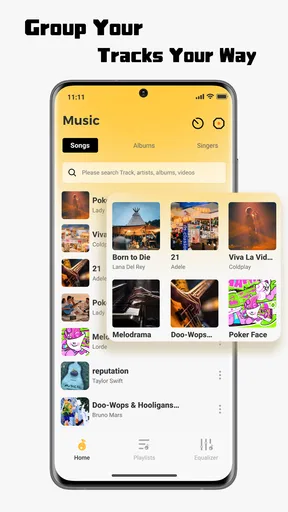
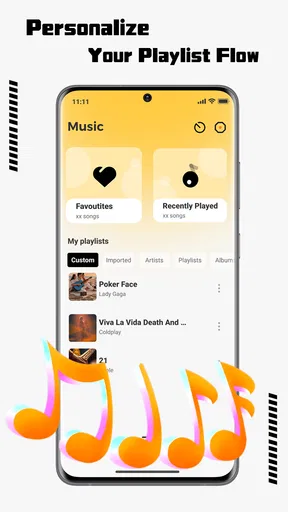
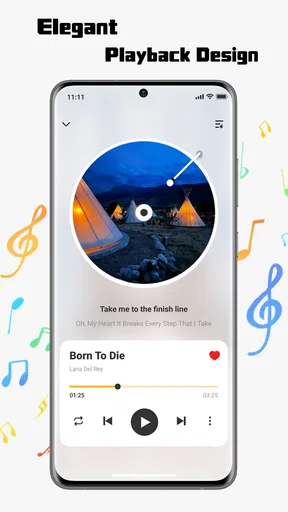
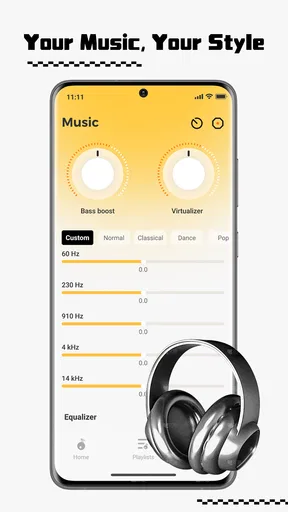
Our Review of SonicNest — Music Player
 Analysis by Appyee
I approached SonicNest as a music and audio app for people who want a more atmospheric way to listen, rather than another service built mainly around charts, social discovery, or a huge streaming catalog. Its “music universe” idea gives the app a distinct personality, but the real question is whether that personality makes everyday listening easier or simply adds another layer between you and your music. After spending time with it, I see a free player that is most appealing when you want a calm, focused listening session and less appealing when you need the deep control, broad catalog, or mature ecosystem offered by the usual alternatives.
The app is developed by YIXIANG and is available for everyone to use. It has reached over ten million installs and holds a 4.2 average from around twelve thousand ratings, which suggests that the concept has found a substantial audience while still leaving room for mixed experiences. SonicNest is currently at version 1.5.4, runs on Android 8.0 and later, and was released on April 3, 2025. Those details matter because this is still a relatively young product: I would judge it as an evolving listening tool, not as a fully settled replacement for every music app on a phone.
How SonicNest feels in its current form
I find the current version easiest to understand when I think of it as a listening space, not a universal music hub. In this section, I look at how its atmosphere fits quiet routines and where that same emphasis can matter less than fast search or detailed library control. That distinction leads naturally to the question of what version 1.5.4 suggests about the app’s priorities.
A music player with a more personal atmosphere
What separates SonicNest from a basic audio player is its attempt to make listening feel like an environment instead of a utility. A conventional player tends to put the track list, play button, and progress bar first. That approach is efficient, but it can also make every listening session feel identical. SonicNest leans toward a more immersive presentation, which suits moments when I want to put on music and stay with it instead of constantly searching, sorting, and switching.
That design direction is useful for quiet routines: reading, commuting with headphones, winding down after work, or creating a consistent background for a task. I would not describe it as a replacement for a dedicated streaming subscription simply because a pleasant interface cannot solve catalog limitations or licensing needs. Its stronger identity is as a player for music you already have access to, or for listeners who value the mood of the experience as much as the mechanics of playback.
The free price lowers the barrier to trying it. I can install it without committing to another monthly bill, which is important for anyone who already pays for one primary music service. SonicNest can sit beside that service as a separate listening space instead of forcing an immediate all-or-nothing decision. The trade-off is that free access should not be confused with the complete feature depth of established platforms. People who expect every familiar music function to be present from the beginning may find the app’s narrower focus noticeable.
Who will get the most from it
I think SonicNest is best suited to listeners who prefer a simple, mood-led routine. If you keep a personal collection, enjoy uninterrupted sessions, or want an alternative to an increasingly busy streaming interface, its presentation can feel refreshing. It also makes sense for someone who wants to explore a newer app without paying first, especially when the goal is to see whether a different listening atmosphere improves the habit of actually playing music.
It is less convincing for people whose music life depends on precise library management. If you maintain carefully tagged albums, switch between several accounts, build collaborative playlists, or need advanced queue behavior, a long-established player may remain the safer choice. The same applies to listeners who want music discovery, editorial recommendations, podcasts, radio, lyrics, and social features all in one place. SonicNest’s appeal comes from its focused identity, and that focus can feel like a limitation when your expectations are broader.
An everyday listening scenario
Imagine finishing a long day and wanting music without turning the next hour into a sequence of decisions. With a conventional service, I might open the app, dismiss promotions, compare playlists, search for an artist, and keep adjusting the queue. SonicNest is more attractive in the opposite situation: I already know the kind of session I want, I select a suitable collection or track, and I let the app become part of the background rather than the center of attention.
That difference sounds small, but it changes how I judge the app. I am not looking for it to beat a full streaming platform at search or catalog size. I am looking for a smoother transition from “I want to listen” to actually listening. When the app’s visual approach supports that transition, it feels purposeful. When I need to organize a complicated library or locate a very specific recording quickly, the same atmosphere becomes less important than speed and control.
What the current version suggests about its direction
A newer player can be appealing when its design feels intentional, but I prefer to judge its direction by how well it supports repeat use rather than by novelty alone. Here I consider the balance SonicNest needs to strike between keeping its distinctive feel and making ordinary listening actions dependable. That balance also sets up the practical limits the app still needs to address.
A young product with room to mature
Version 1.5.4 shows that SonicNest has moved beyond a first experimental release, but I would still keep expectations realistic. The app’s current identity appears to be built around the listening experience rather than a long list of specialist tools. That is a sensible foundation: a player that feels coherent is easier to return to than one that adds features without a clear reason for them.
The release date also places the app in a period where early users are likely to influence its direction. For someone installing it now, that means the experience may feel more actively shaped than the one offered by a mature competitor. I see that as both an opportunity and a caution. Newer software can be more willing to refine its design, but users who depend on a stable, highly predictable workflow may prefer an app with years of accumulated polish.
I would not treat the current version as a promise of specific future additions. There is a meaningful difference between noticing that an app is evolving and assuming that it will soon gain every feature found elsewhere. The safer way to approach SonicNest is to evaluate what it does for your listening routine today, then regard future improvement as a bonus rather than part of the purchase decision.
How the update stage affects existing users
For someone already using SonicNest, staying current with version 1.5.4 is the sensible approach because music apps depend heavily on compatibility with the operating system and the device’s audio behavior. Keeping the app updated also gives existing users the best chance of receiving ongoing refinements as the developer, YIXIANG, continues shaping the product. I would still avoid changing an established listening setup immediately before an important trip or event; a quick personal test is worthwhile whenever a player changes version.
Existing users should also pay attention to their own workflow after an update rather than judging only by the new appearance. Can you reach a favorite listening session without extra steps? Does the queue behave the way you expect? Are your usual headphones, speakers, or car connection still convenient? These checks are more useful than assuming a newer version is automatically better. A visual change may improve the atmosphere while making a familiar action less direct, and that matters if you use the app several times a day.
The app’s large install base means SonicNest is no longer an obscure experiment, yet popularity does not guarantee that its priorities match yours. A listener who enjoys its central concept may be happy to grow with it. Someone who has already built a precise routine around another player may see little reason to move unless SonicNest offers a clear improvement in the moments that matter most.
Practical ways to test it properly
My first recommendation is to test SonicNest with three different listening situations instead of making a decision after one short launch. Try a relaxed session, a focused work session, and a quick “find something now” session. The first two reveal whether the app’s atmosphere helps you stay engaged without distraction. The third exposes whether its navigation is fast enough when you are in a hurry. This simple comparison tells you more than browsing the interface for a few minutes.
A second useful approach is to compare the same music in SonicNest and your usual player. Do not compare only sound quality, because the device, headphones, and source can influence that judgment. Compare the entire path: opening the app, finding the music, starting playback, adjusting the queue, pausing, returning later, and moving to another track. SonicNest’s real advantage, if it works for you, is likely to appear in this sequence rather than in a single button or visual effect.
There is also a subtle trade-off between immersion and visibility. An expressive interface can make listening feel more enjoyable, but it may require more attention than a plain list when you are trying to perform a precise task. I would use the app’s calmer side for planned sessions and keep a more traditional player available for situations where I need instant search or detailed control. Treating the two tools as complementary is more realistic than demanding that one app handle every audio habit.
Questions to consider before making it your main player
If you are wondering whether SonicNest works without a paid plan, the answer is straightforward: it is free to use. That makes it easy to try alongside your current setup. The more important question is not the price but whether its style fits your expectations. Free access is valuable when you want to experiment, but it does not automatically make the app the best home for a large or complex music collection.
Device compatibility is another practical point. The current minimum is Android 8.0, so users on older Android releases will need a newer device or operating system before they can use it. For supported phones, I would still test playback on the equipment you actually use most. A player can feel excellent through headphones yet be less convenient in a car or with a wireless speaker if its controls do not match your habits.
You may also ask whether it can replace a familiar streaming service. My answer is conditional. If your priority is a more focused listening environment and you already have a dependable way to access your music, SonicNest is worth considering as a companion or alternative player. If your priority is a massive on-demand catalog, sophisticated discovery, shared playlists, or a mature cross-device ecosystem, I would keep your existing service and judge SonicNest on its own strengths instead of expecting it to reproduce that entire experience.
Finally, consider how much change you tolerate in a daily app. The current version is recent enough that I would expect the product to keep finding its shape. That can be exciting for users who like trying developing apps and giving them time to improve. It is less suitable for someone who wants every control to remain familiar and every edge case to have a long-established solution.
Where it still needs to prove itself
My main test for SonicNest is whether its unusual presentation remains useful after the first few sessions, especially for people with established music habits or shared listening routines. I’ll look at the situations where a focused player can be a good fit, and where a more mature service may save time. Those trade-offs point to the evidence I would want before relying on it as a primary player.
The limits of a focused concept
SonicNest’s central idea is also its biggest test. A music “universe” can make the player feel distinctive, but the presentation must remain helpful rather than decorative. If I have to pass through an attractive layer every time I want to perform a basic action, the novelty starts working against the app. Music software should create atmosphere without hiding the practical controls people use repeatedly.
The same tension appears in library organization. Casual listeners may appreciate a relaxed approach, while collectors often need dependable sorting, quick filtering, and confidence that albums and tracks will remain easy to locate. I would not recommend abandoning a carefully organized primary library until SonicNest has survived a real-world trial with your own collection and habits. A short test with a few favorite albums can reveal whether the app feels natural or whether you keep reaching for something else.
There is also a difference between a good listening mood and good long-term retention. An app can impress during the first session because it looks and feels different, then become less useful when repeated tasks expose friction. I would judge SonicNest after a week of ordinary use: morning listening, background audio, short sessions, interrupted sessions, and returning to something played earlier. That is where a promising concept either becomes a dependable tool or remains an interesting side option.
Who should choose another option
I would steer professional or highly technical listeners toward a more specialized player if they need detailed audio configuration, extensive metadata tools, or a thoroughly documented workflow. I would also recommend a mainstream streaming platform to anyone whose main purpose is discovering new releases through a large, continuously updated catalog. Those products may feel less personal, but their breadth is exactly what makes them practical for certain users.
SonicNest is not the right choice if you dislike learning a new interface simply for a different mood. It is also a poor fit if your listening depends on advanced sharing, family coordination, or moving seamlessly among many devices. In those cases, the familiar alternative may save time even if it feels less imaginative. I prefer being clear about that because the app’s strongest qualities are experiential, not universal.
What I would watch as it develops
For future versions, I would watch how YIXIANG balances visual identity with everyday efficiency. The most meaningful progress would be improvements that make repeated actions quicker without flattening the app’s character. I would also look for signs that the player handles larger personal libraries gracefully, because that is where a pleasant newcomer must prove it can support long-term use.
I would pay attention to stability across different Android devices as well. A broad install base creates a wide range of screen sizes, hardware behavior, and audio accessories, so consistency matters more than a striking first impression. Users should also judge updates by practical outcomes: fewer interruptions, clearer navigation, and a smoother return to unfinished listening sessions are more valuable than cosmetic novelty on its own.
My final view is that SonicNest is worth trying precisely because it does not feel like a copy of the most familiar music apps. It offers a free, atmospheric route into everyday listening, and its current version gives the idea a usable foundation. I would recommend it to a friend who wants a calmer companion for personal music and enjoys exploring newer software. I would not recommend making it the only player immediately if your routine depends on advanced organization, deep discovery, or a mature multi-device system.
The best way to use SonicNest is to let it earn a place in your routine rather than asking it to replace everything at once. Test it with the music you actually play, compare the complete listening workflow with your current app, and decide whether its atmosphere saves you time or merely adds decoration. For the right listener, that focused difference is enough to make it a welcome part of the phone. For everyone else, keeping a conventional alternative nearby is the more sensible choice.
Verdict
Strengths of SonicNest — Music Player
- Supports background playback while using other apps.
- Offers quick access to playlists and recently played tracks.
- Clean interface makes basic playback controls easy to find.
- Useful for organizing locally stored music in one place.
- Playback continues smoothly after briefly locking the screen.
Limitations of SonicNest — Music Player
- Limited features may disappoint users seeking advanced audio tools.
- Album artwork can be inconsistent for poorly tagged local files.
- Initial library scanning may take time with large music collections.
- Some options may feel unfamiliar without clear in-app guidance.
- Compatibility can vary depending on the audio file format used.
Other Releases by YIXIANG
View All
HyperClean AI
Tools4.3
Similar Picks in This Category
View All
YouTube Music
Google LLC4.4

Samsung Music
Samsung Electronics Co., Ltd.3.8

Spotify: Music and Podcasts
Spotify AB4.3

JioSaavn - Music & Podcasts
Saavn Media Limited4.3

Lark Player:Music Player & MP3
Lark Player Studio - Music, MP3 & Video Player4.6

StarMaker: Sing Karaoke Songs
SKYWORK AI PTE. LTD.4.3
Frequently Asked Questions
What is SonicNest — Music Player, and what can I use it for?
SonicNest — Music Player is designed for listening to music stored on your device in a convenient, organized interface. After exploring the app, its main purpose appears to be local playback rather than providing a large built-in streaming catalog. You can use it to browse your audio library, play individual tracks or albums, create a personal listening queue, and enjoy music without depending entirely on an internet connection.
Does SonicNest — Music Player require an internet connection or a subscription?
For locally stored music, SonicNest should generally be usable without a continuous internet connection, which makes it practical for flights, commuting, or areas with weak coverage. However, availability of optional online features may depend on the version installed and your device. Before downloading, check the app-store listing for current subscription details, advertising information, and whether any advanced tools are restricted behind in-app purchases.
Which audio files and devices are supported by SonicNest?
Support can vary according to the operating system, device model, and the codecs included in the installed release. SonicNest is primarily intended to scan and play common music formats, but unusual, protected, damaged, or very high-resolution files may not work correctly. Android and iOS versions can also differ in library permissions and file access, so confirm compatibility with your collection before moving your entire music library.
How does SonicNest handle music organization, playlists, and playback controls?
The app is most useful when your music files are already organized on your phone. You can typically browse available tracks and use standard controls such as play, pause, skip, repeat, shuffle, and queue management. Playlist and sorting behavior may depend on the current release, so users with large libraries should test search, album grouping, artist filtering, and playlist creation early to make sure the organization matches their listening habits.
Is SonicNest — Music Player safe to download and suitable for everyday listening?
SonicNest can be considered for everyday listening when downloaded from an official Google Play or Apple App Store listing, where the publisher, permissions, ratings, and update history can be reviewed. Before installing, examine the privacy section and note what access the app requests, especially storage, media-library, or notification permissions. Also check recent reviews for reports involving crashes, battery usage, advertisements, or compatibility problems on your specific device.
